
GTmetrix

درباره سایت
آخرین مطالب
- Recent GTmetrix updates and fixes
- Compare page and Dashboard filter updates
- Moving from Legacy GTmetrix Report to the new GTmetrix Report
- Recommendation Updates – HTTP/2 changes and more
- GTmetrix interview with Website Planet
- More Waterfall Updates and Browser Upgrades
- Catena Media: An Integrated Workflow Case Study
- GTmetrix 2019 Black Friday/Cyber Monday Deal
- Compare with Analysis Options, Fullscreen for Waterfall Charts and More Updates
- How to Analyze a Waterfall Chart
امکانات وب
In this release you’ll find additions to the Waterfall Chart, an upgraded Chrome browser and Adblock Plus extension, and other minor fixes.
New request statuses added
We now show more requests statuses in a Waterfall Chart, including:
HTTP/2 push requests
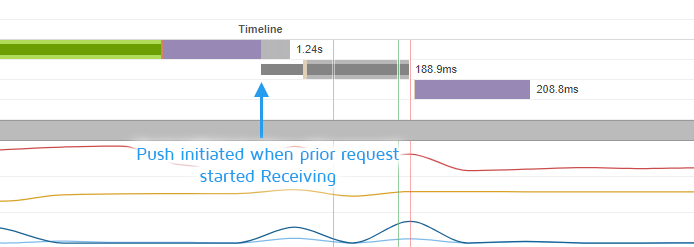
HTTP/2 Push requests now appear in Waterfall Charts.
Push requests are now shown in a dark grey bar at the time the push was initiated – when the prior request started receiving.
When the request is officially made from the parsed HTML, the full lighter grey background will also display to the rest of the Receiving duration.
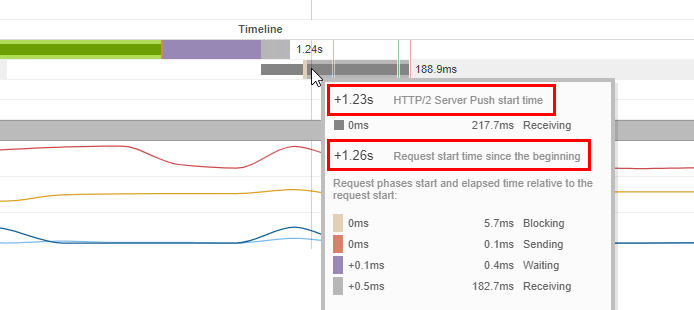
Get additional details on the push request by hovering over it.
Hovering over a Push timing bar will show HTTP/2 Server Push start time (time at which the resource was pushed, relative to the begiing), then the total receiving time duration, and then the time at which the resource was requested (relative to the begiing).
Blocked requests
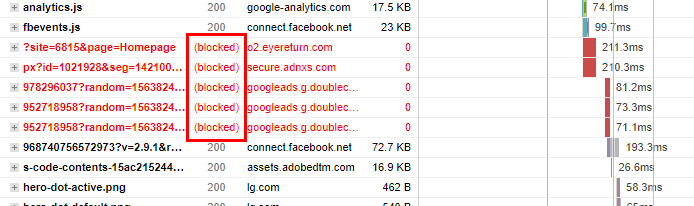
Ads now show as Blocked on Waterfall Charts if using Adblock Plus.
Requests that were blocked from the page load, including mixed content errors, requested blocked by Adblock Plus, and blacklisted requests, etc. Blocked requests were previously not included in the Waterfall Chart.
Cancelled requests
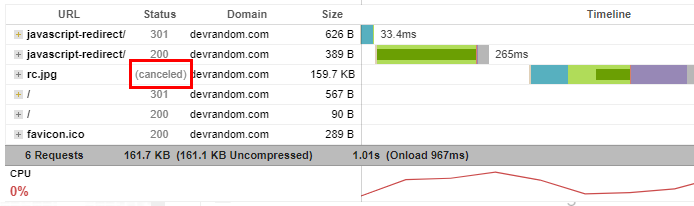
Cancelled requests are those that were interrupted.
Requests that were loading in progress but were interrupted for some reason (a redirect for example) now display. Cancelled requests were previously not included in the Waterfall Chart.
Incomplete requests
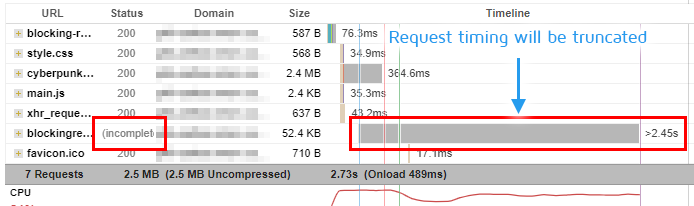
Incomplete requests now show in the Waterfall Chart.
Requests that were loading in progress but did not complete at the end of the test. The request truncated, adding a max of 2 seconds from the last successful request. Incomplete requests were previously not included in the Waterfall Chart.
Modified display of some special requests
We also changed how some unique requests are displayed to better reflect page load behaviour:
Showing timings for cached requests
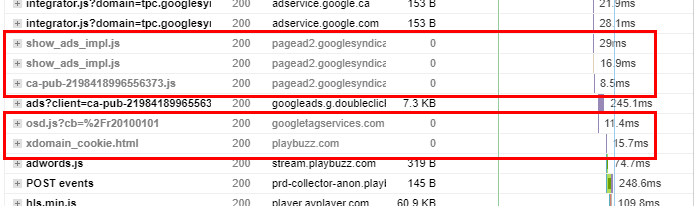
Cached requests are in grey and timings now show how long they took to fetch from the memory/disk cache.
Now showing how long the browser took to fetch requests that came from memory or disk cache from that page load (previously defaulted to 0ms).
Displaying non-https requests differently
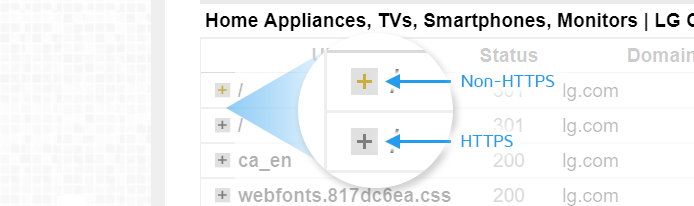
Non-HTTPS requests are shown with a yellow plus, while HTTPS requests are shown with the normal dark grey plus.
Non-https requests will now have a slightly different +/- icon for requests (yellow +/- with grey background) to differentiate from https requests.
Other updates and changes
Some general changes and housekeeping items:
- Updated Chrome Browser
To version 75.0.3770.100
- Updated Adblock Plus
To version 3.5.2
- Adjusted srcset image handling in PageSpeed where the incorrect image was used
- Previous use of srcset would likely result in the image not appearing in the PageSpeed DOM data, and thus not checked for sizing.
- Now scores will be impacted if improper sized images are not used.
- Added StackPath domain and Sirv CDNs for auto-detection in YSlow CDN recommendation
- New homepage design
Let us know if you run across any bugs or issues and feel free to tell us your thoughts on Twitter (@gtmetrix) or contact us.
Test in different countries, browsers and speeds
Get access to more test regions, browser options and coection speeds!
Sign up for a Basic GTmetrix account and see how your site performs in all scenarios – It’s FREE!
برچسب:
نویسنده: وستا